KUdos Finance Manager
A full-stack finance and purchase order management system for a VEX-U robotics team with automated PO generation and multi-signature approval workflows.
Project Overview
KUdos Finance Manager is a finance and purchase order management application I built for the KUdos VEX-U robotics team at Kettering University. The app replaces a sprawl of Google Sheets and Drive folders with a unified system for managing purchase orders, tracking expenses, maintaining sponsor relationships, and monitoring budgets.
Before this app, the team managed finances across multiple spreadsheets with fragile formulas, stored PO documents in nested Drive folders, and tracked approvals through email chains. Finding the status of a purchase or verifying account balances required navigating multiple files and hoping the data was current.
KUdos Finance Manager consolidates everything into one interface where team members can create purchase orders, route them through approval workflows, generate branded PO documents, track the ledger, and manage sponsor data.
Role: Solo developer, including product design, database architecture, document generation, authentication, file storage, and data migration from legacy spreadsheets.
Tech Stack: Next.js 16, React 19, TypeScript, Supabase, PostgreSQL, Tailwind CSS, shadcn/ui (Base UI), @react-pdf/renderer, Zod
The Problem
The KUdos team had a functional but fragile finance workflow built on Google Sheets and Drive:
- Purchase orders lived as individual Excel files in Drive folders, each manually numbered.
- The finance tracker spreadsheet had positional formulas that broke when rows were inserted.
- Approval status was tracked informally through signatures on printed documents or email confirmations.
- Finding a specific PO meant navigating folder hierarchies and hoping the file naming was consistent.
- Account balances required trusting that every transaction had been entered correctly.
- Sponsor information, restricted funds, and budgets lived in separate tabs with no connections.
The manual processes worked, but they scaled poorly. As the team grew and purchase volume increased, the spreadsheet workflow became a bottleneck. The goal was to build a system that preserved the team's existing processes (particularly the formal PO approval workflow) while eliminating the friction of manual document management.
The Solution
KUdos Finance Manager provides a complete finance workflow from purchase request through fulfillment. The system handles:
- Purchase order creation with automatic numbering
- Multi-signature approval routing
- Branded PDF document generation
- Ledger tracking with running balances
- Sponsor CRM with gift tracking
- Budget vs. actual reporting
- Restricted fund management
- Vendor database
- Document storage for receipts and invoices
The app mirrors the team's existing purchasing process manual while automating the tedious parts. Creating a PO takes seconds instead of copying a template and manually filling fields. Approvals happen in the app instead of through email. Finding any PO is a search away instead of a folder dive.
Key Features
| Feature | What It Does | Why It Matters |
|---|---|---|
| PO Creation Wizard | Guided form with auto-numbering and line items | Eliminates manual template copying and numbering errors |
| PDF Generator | Produces branded PO documents matching the official template | Creates professional documents instantly for vendor submission |
| Multi-Signature Approval | Routes POs through required approvers with digital signatures | Enforces the approval process without paper or email chains |
| Ledger with Running Balance | Tracks all transactions with computed balances | Provides accurate, real-time account status |
| Sponsor CRM | Manages sponsor contacts, tiers, gifts, and restricted funds | Keeps sponsor relationships organized and trackable |
| Budget vs. Actual | Compares planned budgets against actual spending | Helps the team stay on track financially |
| Document Storage | Stores receipts, invoices, and PO attachments | Keeps all documentation connected to the relevant records |
Technical Deep Dive: Purchase Order Lifecycle
The most complex part of KUdos Finance Manager is the purchase order system. POs follow a seven-step lifecycle that mirrors the team's purchasing process manual.
PO Numbering
Purchase orders have structured numbers with two formats:
- Regular POs:
KUdos-0001throughKUdos-9999(team funds, blue branding) - External POs:
KUdos-Ext-0001throughKUdos-Ext-9999(Robotics Center funds, green branding)
Numbers are allocated atomically through a database function allocate_po_number(account_id). This prevents race conditions when multiple users create POs simultaneously and preserves gaps when POs are deleted (numbers are not reused).
CREATE FUNCTION allocate_po_number(p_account_id uuid)
RETURNS text AS $$
DECLARE
  v_seq int;
  v_prefix text;
BEGIN
  UPDATE accounts
  SET next_po_seq = next_po_seq + 1
  WHERE id = p_account_id
  RETURNING next_po_seq - 1, po_prefix INTO v_seq, v_prefix;

  RETURN v_prefix || lpad(v_seq::text, 4, '0');
END;
$$ LANGUAGE plpgsql;
Approval Workflow
The team's purchasing process requires three signatures for approval:
- Team Captain — overall approval authority
- A-Section Deputy — represents A-Section students
- B-Section Deputy — represents B-Section students
Kettering University operates on a co-op schedule where students alternate between academic terms and work terms. A-Section and B-Section students are on campus at different times, so having deputies from both sections ensures purchasing decisions have representation even when half the team is away on co-op.
A PO moves to "Approved" status only when all three positions have signed. The app supports two signature modes:
- Deputies mode: Three signature blocks (Team Captain + two Deputies)
- Section Captains mode: Two signature blocks (for simplified workflows)
Each user has both an app role (admin/member, for permissions) and a captain role (team_captain/section_a/section_b, for signing authority). These are independent: someone can be an admin without signing authority, or a section captain without admin access.
When a user signs, the app matches their captain role to the appropriate signature block and records the timestamp. The UI shows which blocks are signed and which are pending.
Kettering Tier Classification
Kettering University has different approval requirements based on PO total:
- Standard tier: POs under $5,000
- VP-level tier: POs $5,000 and above
This classification is stored as a generated column that updates automatically when line items change. The app displays the tier prominently so users know when additional university approval is needed.
Technical Deep Dive: PDF Generation
A core requirement was generating branded PO documents that match the team's official template. Vendors receive these PDFs, so they need to look professional and contain all required information.
The PDF generator uses @react-pdf/renderer to create documents server-side. The template is defined as a React component with precise positioning to match the original Excel layout.
Template structure:
- Header with team logo and account-specific color (blue for regular, green for external)
- PO number, date, and vendor information
- Line items table with SKU, description, quantity, unit price, and total
- Subtotal, shipping, tax, and grand total
- Three signature blocks with names, dates, and signature images
- Footer with team contact information
// Simplified PDF component structure
const PODocument = ({ po, lineItems, signatures }) => (
  <Document>
    <Page size="LETTER" style={styles.page}>
      <Header poNumber={po.po_number} accountType={po.account_type} />
      <VendorBlock vendor={po.vendor} />
      <LineItemsTable items={lineItems} />
      <TotalsBlock subtotal={po.subtotal} shipping={po.shipping} total={po.total} />
      <SignatureBlocks signatures={signatures} mode={po.signature_mode} />
      <Footer />
    </Page>
  </Document>
);
Fonts are loaded from the public/fonts/ directory (Roboto family) to ensure consistent rendering across environments. The PDF route (/purchase-orders/[id]/pdf) streams the generated document directly to the browser.
Users can also upload signature images through their profile page. When a signature image exists, the PDF renders it in the appropriate block instead of just showing a name and date.
Technical Deep Dive: Ledger and Running Balances
The ledger tracks all financial transactions for both accounts. Each transaction records:
- Date
- Description
- Category (mapped to budget line items)
- Amount (positive for income, negative for expenses)
- Associated PO (if applicable)
- Verification status
Running balance calculation is handled by a database view rather than stored values. This ensures balances are always accurate and eliminates synchronization bugs.
CREATE VIEW v_account_ledger AS
SELECT
  t.*,
  SUM(t.amount) OVER (
    PARTITION BY t.account_id
    ORDER BY t.date, t.created_at
    ROWS BETWEEN UNBOUNDED PRECEDING AND CURRENT ROW
  ) AS running_balance
FROM transactions t
ORDER BY t.date DESC, t.created_at DESC;
The ledger page displays transactions with color-coded categories and red/green amounts for expenses/income. Admins can add manual entries for deposits, adjustments, or transactions not tied to POs.
Season filtering allows viewing transactions for specific fiscal years. Each transaction links to a season, and the budget vs. actual view aggregates spending by category within the selected season.
Data Migration
A significant part of the project was migrating existing data from the legacy spreadsheets and Drive folders. The team had:
- 85 purchase orders (regular 0001-0074, external 0001-0011)
- 352 line items
- 263 document files (PO PDFs, receipts, invoices)
- Complete ledger history
- Sponsor records and gift history
- Budget allocations
The import script parses Excel files using openpyxl, extracts data from known cell positions, uploads documents to Supabase Storage, and bulk-inserts records. The script uses the service role key to bypass RLS during import.
PO Excel parsing extracts from the template format:
- Request tab: PO number (H3), date (H2), vendor (A9-A11), line items (rows 14+)
- Receipt tab: verified amount (A14), signer (A19), receipt links (A23+)
The migration preserved all historical data while establishing clean starting points for the new system. PO numbering continues from where the legacy data ended (0075 for regular, Ext-0012 for external).
Database Architecture
The database has 19 tables organized around the core domains:
accounts (regular + external)
├── purchase_orders
│   ├── po_line_items
│   ├── po_signatures
│   ├── vendor_invoices
│   │   └── invoice_line_items
│   └── receipts
│       └── receipt_attachments
├── transactions (ledger)
└── budgets

sponsors
├── sponsor_gifts
└── sponsor_restricted_funds

vendors
categories (reference data)
seasons (fiscal years)
profiles (users with roles)
app_settings (signature mode, etc.)
Row-level security controls access:
- Any authenticated user can read (single-team app)
- Writes are gated by
profiles.rolevia acurrent_app_role()function - The first signup becomes admin through a bootstrap trigger
Permissions Model
The app has a simple two-tier permission model:
| Role | Permissions |
|---|---|
| Admin | Full access: create/edit/delete POs, manage ledger, approve users, configure settings |
| Member | View access: see all data, sign POs (if they have captain role), cannot create or edit |
Captain roles (for signing) are separate from app roles:
team_captain— signs the Team Captain blocksection_a— signs the A-Section Deputy blocksection_b— signs the B-Section Deputy block
A user can be a member with signing authority (can sign but not create) or an admin without signing authority (can create but signature is not required).
Sponsor CRM
The sponsor management system tracks:
- Sponsor companies and contacts
- Sponsor tiers (Platinum, Gold, Silver, Bronze, Friend)
- Gift history with amounts and dates
- Restricted fund designations (gifts earmarked for specific purposes)
When a sponsor makes a gift, the app records the amount, date, and any restrictions. Restricted funds can be linked to specific POs that draw from those funds, creating an audit trail for how sponsor money was used.
The sponsor list shows total contributions, current tier, and recent activity. This helps the team maintain relationships and recognize sponsors appropriately.
Budget vs. Actual
The budget system compares planned spending against actual transactions. Budgets are defined per season with amounts allocated to categories.
The dashboard shows:
- Budget amount per category
- Actual spending (sum of transactions in that category)
- Remaining balance
- Percentage used
Categories in the budget system map to transaction categories in the ledger. When transactions are categorized consistently, the budget view provides accurate spending tracking.
User Interface
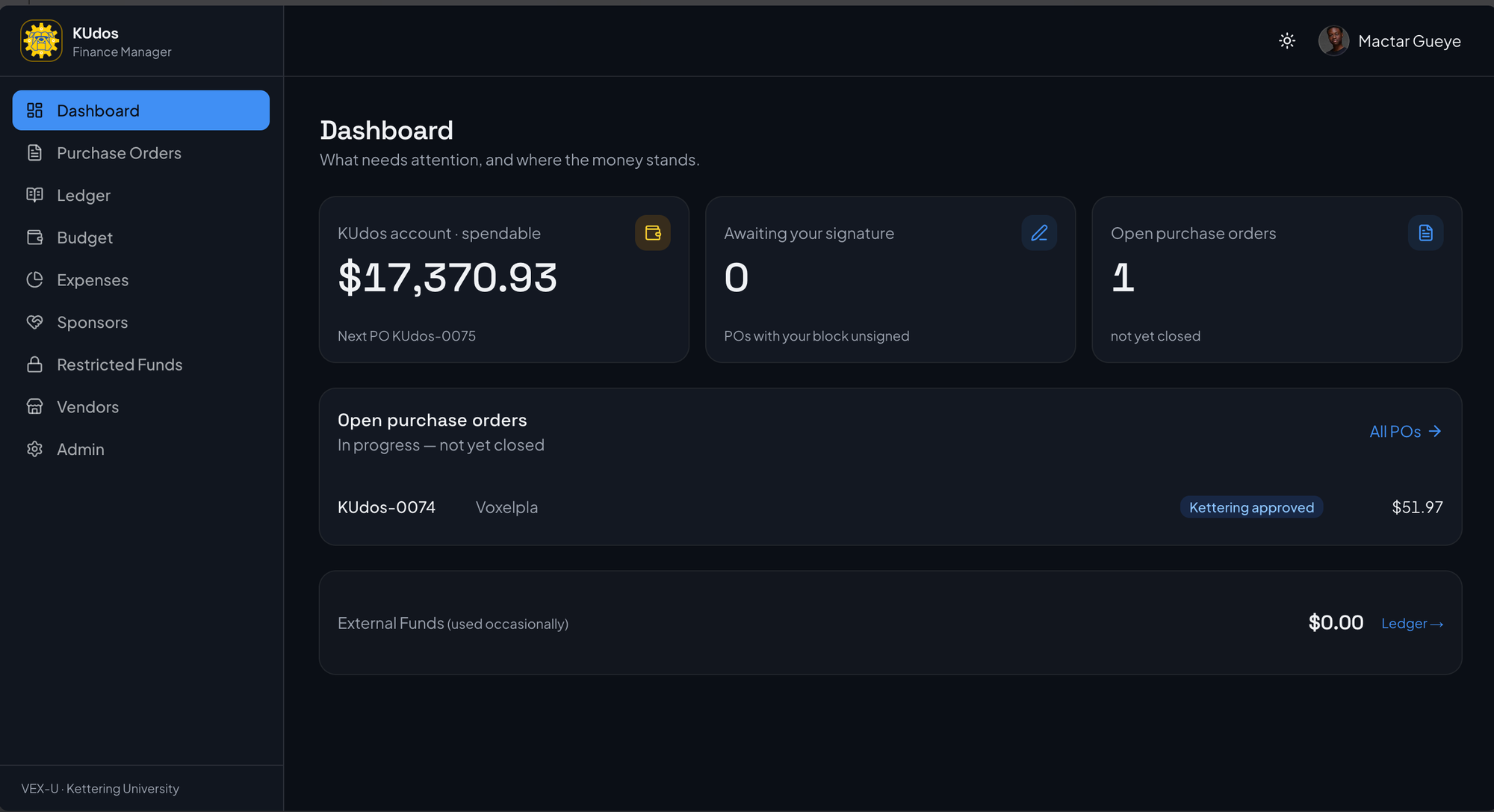
The app uses a sidebar navigation pattern with the team's gold accent color. Key pages:
- Dashboard: Account balances, recent POs, quick stats
- Purchase Orders: Split views for regular and external accounts, search, create wizard
- Ledger: Transaction history with running balances, add/edit entries
- Budget: Category-by-category spending vs. plan
- Sponsors: CRM with gift history and tier management
- Restricted Funds: Earmarked money with linked POs
- Vendors: Vendor database with contact info
- Admin: User management, signature mode, season configuration
PO detail pages show the full document with line items, signatures, status controls, and attached files. Users can download the PDF, upload receipts, and track the order through fulfillment.
Technical Challenges
The hardest part was accurately migrating data from the legacy spreadsheets. The Excel files had inconsistent formatting, merged cells, and positional formulas. Parsing required careful handling of edge cases and validation to ensure imported data was correct.
The PDF generation also required significant iteration. Matching the exact layout of the original template meant precise positioning of elements, correct font sizes, and proper handling of varying content lengths (long descriptions, many line items).
The signature workflow needed to handle the independence of app roles and captain roles while still enforcing the approval requirements. The solution separates these concerns cleanly in the database and lets the UI compose them appropriately.
Impact
KUdos Finance Manager eliminates the friction of the spreadsheet-based workflow. Creating a PO that previously required copying a template, manually entering data, and saving to the correct folder now takes a few form fields. Finding a PO is a search instead of a folder dive. Knowing the account balance is instant instead of trusting spreadsheet formulas.
The approval workflow is now tracked in the system rather than through email or paper. Approvers can see pending POs and sign directly in the app. The team captain has visibility into all purchase activity without chasing down individual documents.
What I Learned
KUdos Finance Manager taught me about building systems that replace existing workflows. The key was understanding the team's purchasing process manual and preserving its requirements while eliminating manual steps.
I gained experience with PDF generation in Node.js, particularly the challenges of precise layout control and font handling. The @react-pdf/renderer library is powerful but requires careful attention to detail for professional-looking output.
The data migration was an exercise in defensive parsing. Real-world data is messy, and the import script needed to handle edge cases gracefully while flagging issues for manual review.
Future Plans
Planned improvements include:
- Rendering uploaded signature images onto PDF documents
- Vercel deployment for team access
- Email notifications for approval routing
- Receipt OCR for automatic data extraction
- Mobile-optimized views for on-the-go approvals
Tech Stack
| Area | Tools |
|---|---|
| Frontend | Next.js 16, React 19, TypeScript, Tailwind CSS |
| Components | shadcn/ui (Base UI), react-hook-form, Zod |
| Backend | Supabase, PostgreSQL, Server Actions |
| Auth | Supabase Auth (email/password) |
| Storage | Supabase Storage |
| @react-pdf/renderer | |
| Deployment | Vercel, Supabase |